EcoWatch Detection App
Streamlit app that runs YOLOv8 to detect litter and illegal dumping in images, videos, and live webcam feeds, with stats and downloads.
Tech Stack
Tags
Key Outcomes
- Built a Streamlit UI for image, video, and webcam detection with live preview and progress tracking
- Implemented a dynamic model selector that loads any .pt file in weights/ without code changes
- Added confidence threshold controls plus detection stats table, bar chart, and CSV and image downloads
- Documented local and Streamlit Cloud deployment requirements including OpenCV system packages
Overview
EcoWatch is a Streamlit web application that runs YOLOv8 object detection to identify litter, garbage, and illegal dumping. It supports three input modes, uploaded images, uploaded videos, and a live webcam feed. The app is designed to work out of the box with a pretrained YOLOv8 model, but it is also set up so a custom fine-tuned model can be dropped in and used immediately.
What It Does
- Image inference: upload an image and get annotated bounding boxes, a detection stats table, a bar chart, and downloads for the annotated image and a detections CSV.
- Video inference: upload a video and process it frame-by-frame with a live preview and a progress bar.
- Webcam inference: run detection on the local machine's camera feed.
- Dynamic model selector: any
.ptfile placed inweights/automatically appears in the sidebar dropdown. - Confidence threshold control: sidebar slider to adjust detection sensitivity.
Architecture
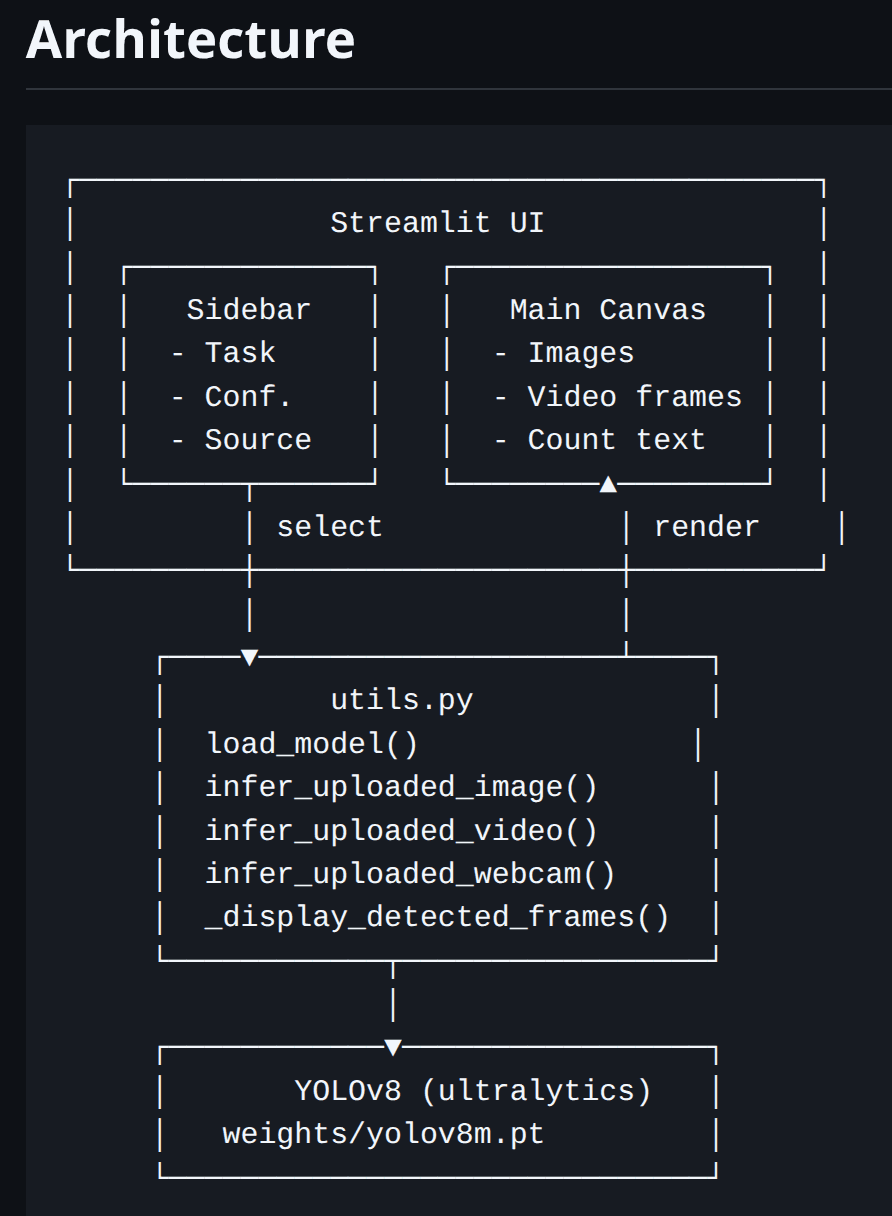
The UI is built with Streamlit and routes user actions to inference helpers inside utils.py. The core model is YOLOv8 via the Ultralytics library.
app.py: Streamlit entry point, layout, sidebar controls, and routing by source type.utils.py: model loading, frame annotation and rendering, plus inference flows for image, video, and webcam.config.py: centralized settings like sources list and default weights path.
A key design choice was the dynamic model selector. Instead of hardcoding a single weights file, the app scans the weights folder at startup and lets the user swap models from the UI.
Key Features and Implementation Notes
Dynamic model selection
The sidebar dropdown is populated from all .pt files in weights/. This makes it easy to test different models or switch from a COCO-pretrained model to a custom aerial-imagery model without editing code.
Video and webcam pipeline
OpenCV is used for frame decoding and camera capture. Video mode processes sequential frames and shows progress so the user can see how far the run is.
Results and exports
For image runs, the app provides:
- annotated output image download
- detections table (classes, confidence, bounding boxes)
- bar chart of detections by class
- CSV download for the detections
Training a Custom Model
Training is done outside the app using Ultralytics training workflows. After training, the best weights can be copied into weights/ and selected from the UI.
Deployment Notes
The app runs locally via streamlit run app.py. For hosted environments like Streamlit Cloud, system dependencies for OpenCV may be required (for example, libgl1-mesa-glx and libglib2.0-0). Webcam mode is intended for local runs and typically does not work on hosted deployments.
Why This Project Matters
This app turns a computer vision model into an interactive tool that can be tested quickly on real media. It is a practical step toward environmental monitoring workflows where detection results need to be visual, measurable, and easy to export.